React state snapshots and batching
You set React state to 1 and the next line still reads 0. See why in the first minute, and how to get the new value. Then two bugs the same rule causes (a "buy 2, get 1 free" button that adds one, and clicks that go missing while the server answers), the one change that fixes both, and the bug this rule saves you from. Along the way: state as a snapshot, batching, updater functions, and whether setState is really asynchronous.
In this lesson
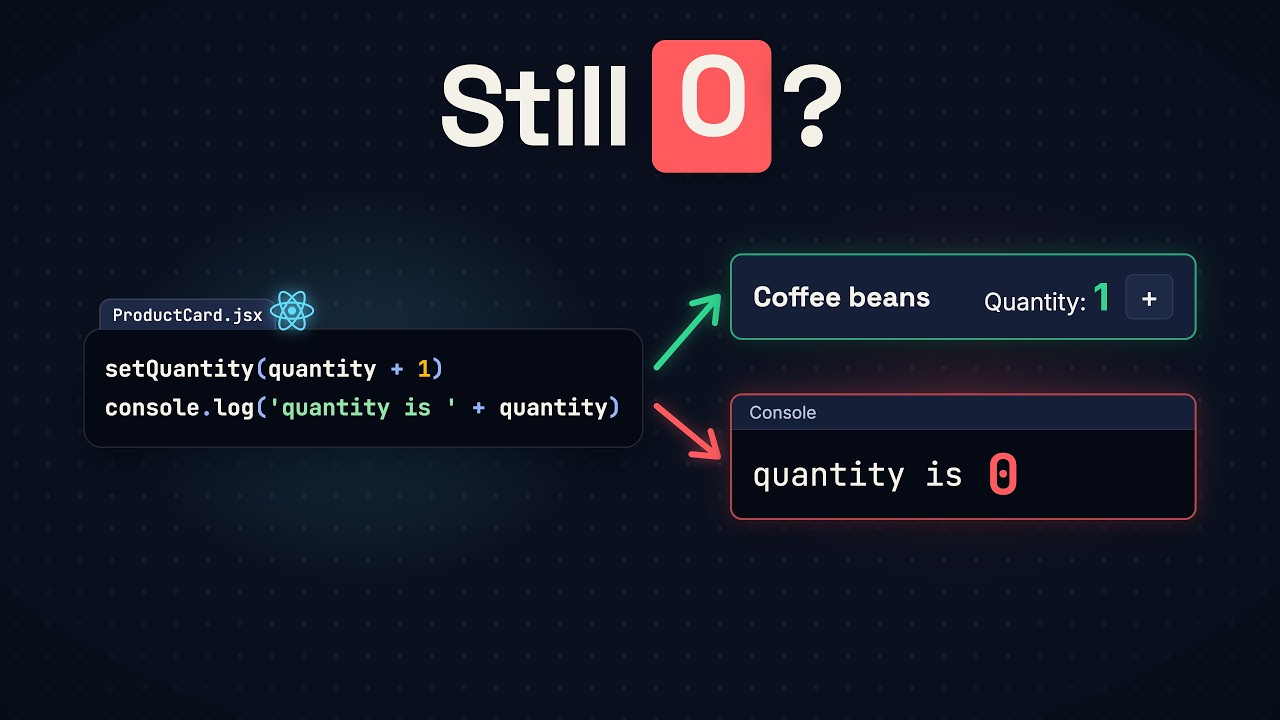
Here’s the shop page again: two product cards, coffee beans and paper filters, each with a quantity and a plus button. The button’s handler calls setQuantity with the quantity plus one, and on the very next line logs quantity. Click once, and the page says 1 while the console says 0. Click again: 2 on the page, 1 in the console. The console is always one click behind.
So why does React state show the old value? This lesson answers that first, with the fix most people search for. Then it follows the same cause into two worse bugs: an offer that adds the wrong number, and fast clicks that go missing with no error. One change fixes both. And the old value turns out to be what keeps a slower handler right.
The code runs in a React project made with Vite (npm create vite@latest, then React and JavaScript), the same kind of project as the last lesson. JSX doesn’t run in plain JavaScript, so you need that build step. Each example replaces src/App.jsx.
One click behind
This is the whole app. ProductCard keeps its quantity in state, and the plus button’s handler, add, sets it and then logs it:
import { useState } from 'react'

function ProductCard({ name }) {
  const [quantity, setQuantity] = useState(0)

  function add() {
    setQuantity(quantity + 1)
    console.log('quantity is ' + quantity)
  }

  return (
    <div className="product">
      <h3>{name}</h3>
      <p>Quantity: {quantity}</p>
      <button onClick={add}>+</button>
    </div>
  )
}

export default function App() {
  return (
    <section className="shop">
      <h2>Shop</h2>
      <ProductCard name="Coffee beans" />
      <ProductCard name="Paper filters" />
    </section>
  )
}
Click the plus button on the coffee beans three times. The page says Quantity: 1, then 2, then 3. The console says:
quantity is 0
quantity is 1
quantity is 2
The reason is the first line of ProductCard: quantity is a const. Every time React runs your function, useState hands back the current number, and the function makes a new quantity that never changes. The add your click ran was made in the run where quantity was 0, so its log says 0. setQuantity doesn’t change that 0. It asks React to run your function again, and only that new run gets 1.
So when the next line needs the new number, work it out first, store it in a variable, and use the variable in both places:
function add() {
  const next = quantity + 1
  setQuantity(next)
  console.log('quantity is ' + next)
}
Now two clicks print quantity is 1 and quantity is 2, matching the page.
Buy 2, get 1
Three words before going further. Each run of your function is a render. The values one render gets, like its quantity, are its snapshot. And a function a click runs, like add, is an event handler.
The shop adds an offer: buy two bags, get one free. The offer’s handler asks React for quantity + 2, and on the next line for quantity + 1, the free bag. Add it inside ProductCard, with a button after the plus:
function addOffer() {
  setQuantity(quantity + 2)
  setQuantity(quantity + 1)
}<button onClick={add}>+</button>
<button onClick={addOffer}>Buy 2, get 1 free</button>The quantity is 0. Before you click the offer, guess what the page will say.
It says Quantity: 1. Both lines read the same snapshot, where quantity is 0, so the first line asked for 2 and the second asked for 1. React didn’t render between those two lines, so the page never showed 2. It kept both requests in a queue, rendered once after the last line, and the last request won.
You can watch it happen. Add a log to the top of ProductCard and a few inside the handler:
const [quantity, setQuantity] = useState(0)
console.log('render: quantity is ' + quantity + ' in ' + name)

function addOffer() {
  setQuantity(quantity + 2)
  console.log('asked for ' + (quantity + 2))
  setQuantity(quantity + 1)
  console.log('asked for ' + (quantity + 1))
  console.log('handler finished')
}
One click on the coffee beans’ offer prints:
asked for 2
asked for 1
handler finished
render: quantity is 1 in Coffee beans
render: quantity is 1 in Coffee beans
The handler runs to its last line before React renders. The render line shows up twice because Vite’s starter wraps the app in <StrictMode>, which runs every render twice in development to catch mistakes. Without it, there is one.
This is batching: requests made in a row cost one render. But the customer who paid for two bags has one.
Clicks that go missing
Two lines in a row are easy to spot. A handler that waits is harder. Say the plus button first asks the server whether the coffee is in stock, and the answer takes a second. Here a checkStock function stands in for the server; put it above ProductCard:
// Stands in for the server: its answer takes one second.
function checkStock() {
  return new Promise((resolve) => setTimeout(resolve, 1000))
}
The handler waits for it, then sets the quantity:
async function add() {
  await checkStock()
  setQuantity(quantity + 1)
}
Click plus three times quickly, all inside that second. The page stays at Quantity: 0 while the clicks wait, and once the answers are back it says Quantity: 1. The console is empty.
Nothing was set while the three clicks were waiting, so React had no reason to render. All three clicks ran the same handler with the same snapshot, where quantity is 0, and each one asked for 0 + 1. Two clicks are lost, and there’s no error anywhere.
Pass a function
Both bugs sent React a number worked out from an old snapshot. So stop sending a number. Pass setQuantity a function instead. It takes the newest quantity, named q here, and returns q + 1. This is an updater function:
function add() {
  setQuantity((q) => q + 1)
}

function addOffer() {
  setQuantity((q) => q + 2)
  setQuantity((q) => q + 1)
}
In the queue, a number means “replace the quantity with this”. An updater means “take the newest quantity and work from it”. When React renders next, it works through the queue in order. For the offer, 0 becomes 2, and 2 becomes 3. Click the offer, and the page says Quantity: 3. Click plus after it, and it says 4. The paper filters’ offer gives its own Quantity: 3.
The stock check gets the same fix, with the wait back on top:
async function add() {
  await checkStock()
  setQuantity((q) => q + 1)
}
Three quick clicks: the page holds at Quantity: 0 during the wait, then ends at Quantity: 3. Each answer that comes back adds one to the newest quantity, not to the 0 its click started with.
You don’t need an updater everywhere, though. A handler that sets a plain value once, with no waiting, works. The first counter in this lesson, setQuantity(quantity + 1), still counts 1, 2, 3 with three clicks in a row, because React always applies an update before the next click runs. Use an updater when the handler waits, or when it sets the same state twice.
And an updater doesn’t change the snapshot. On the line after that call, quantity is still the old value. The last section shows how far that goes.
The old value, on purpose
So is the old value a mistake in React? Add an Order button. Its handler sends the order to the server with quantity in it, waits for the answer, and then confirms on the page, with quantity again. sendOrder stands in for the server, above ProductCard like checkStock, and the confirmation is a second piece of state, message:
// Stands in for the server: its answer takes one second.
function sendOrder(name, quantity) {
  console.log('order sent: ' + quantity + ' x ' + name)
  return new Promise((resolve) => setTimeout(resolve, 1000))
}

function ProductCard({ name }) {
  const [quantity, setQuantity] = useState(0)
  const [message, setMessage] = useState('')

  function add() {
    setQuantity((q) => q + 1)
  }

  async function order() {
    await sendOrder(name, quantity)
    setMessage('Ordered ' + quantity)
  }

  return (
    <div className="product">
      <h3>{name}</h3>
      <p>Quantity: {quantity}</p>
      <button onClick={add}>+</button>
      <button onClick={order}>Order</button>
      <p>{message}</p>
    </div>
  )
}
Click plus twice, so the page says Quantity: 2, and click Order. The console prints:
order sent: 2 x Coffee beansWhile the server is answering, click plus once more. The page says Quantity: 3. What will the confirmation say?
Ordered 2. Both lines of order read quantity, and both got 2, because a handler keeps the snapshot of the render it came from. And 2 is right: the order that went out was for 2. If quantity had changed while the handler was waiting, the page would confirm 3, an order nobody sent.
It’s the same rule as in the first example: a handler finishes with the values it started with. The old value is what keeps this handler right.
What does it print?
Last prediction, the kind an interviewer can ask. The offer’s handler adds two with an updater, waits for the stock check, adds the free bag with another updater, and then logs quantity:
async function addOffer() {
  setQuantity((q) => q + 2)
  await checkStock()
  setQuantity((q) => q + 1)
  console.log('quantity is ' + quantity)
}
Click plus once, so the quantity is 1, then click the offer. Half a second in, while the handler is still waiting, the page already says Quantity: 3: at an await, React renders what was asked for so far. When the answer comes back, the page says Quantity: 4. What does the console print?
quantity is 1The page changed twice while this handler ran, and its quantity is still 1. You’ll hear that setting state is asynchronous, but the new value isn’t late. This handler never gets it.
The updater on the third line matters too. With setQuantity(quantity + 1) there instead, the handler asks for 1 + 1 from its old snapshot, and the page goes from 3 back to Quantity: 2.
In one line
quantity is a constant in each render, and setQuantity never changes it: it queues a request for the next render, and requests made in a row are batched into one render. When the next value depends on the value before, pass an updater. Now you can read a handler and say what the page will show, and what the console will print, before you click. Next in this course: lists, and what goes wrong when React can’t tell two items apart.
Video transcript
One click behind
This React state was just set to one, and on the very next line it still shows the old value: zero. Click the plus button. The page says one. The console says zero. Click again: two on the page, one in the console. The console is always one click behind. So why does React state show the old value? Because quantity is a constant. Every time React runs your function, it makes a new quantity, and that quantity never changes. The code your click ran was made when quantity was zero, so its log says zero. setQuantity doesn't change that zero. It asks React to run your function again, and only the new run gets the number one. So when the next line needs the new number, work it out first, store it in a variable, and log that. But the old value causes a worse bug. When that code has to wait for the server, three clicks add only one, and the console stays empty. By the end you'll know what a snapshot is, what batching is, and when to pass setQuantity a function. And keep one question in mind: is the old value a mistake in React?
Buy 2, get 1
Each run of your function is called a render. The values a render gets are its snapshot. And the function a click runs is an event handler. Now the first prediction. The shop has an offer: buy two bags, get one free. So the offer's handler asks React for quantity plus two, and on the next line, for quantity plus one, the free bag. The quantity is zero. Click the offer. What does the page say?
It says one. Both lines read the same snapshot, where quantity is zero. So the first line asked for two, and the second line asked for one. React did not render between those two lines, so the page never showed two. It kept both requests in a queue, rendered once after the last line, and the last request won. That's called batching: requests made in a row cost one render. But the customer who paid for two bags has one.
Clicks that go missing
Two lines in a row are easy to spot. A handler that waits is harder to spot. That's the bug from the opening. The plus button's handler now asks the server if the coffee is in stock. The answer takes a second. Then it calls setQuantity with quantity plus one. Click plus three times quickly and the page says one. Nothing was set while the three clicks were waiting. React had no reason to render. So all three clicks ran the same handler with the same snapshot. Two clicks are lost. There is no error anywhere.
Pass a function
Both bugs sent React a number worked out from an old snapshot. So stop sending a number. Pass setQuantity a function. It takes the newest quantity, named q here, and returns q plus one. This is an updater function. In the queue, a number means "replace the quantity with this". An updater means "take the newest quantity and add to it". When React renders next, it works through the queue in order. For the offer, zero becomes two, and two becomes three. Click the offer, and the page says three. Click plus three times during the stock check, and the page says three. You don't need an updater everywhere, though. A handler that sets a plain value once, with no waiting, works, because React always applies an update before the next click. Use an updater when the handler waits, or sets the same state twice. And an updater doesn't change the snapshot. On the line after that call, quantity is still the old value.
The old value, on purpose
So is the old value a mistake in React? Add an Order button. Its handler sends the order to the server with quantity in it, waits for the answer, and then confirms on the page, with quantity again. Set the quantity to two, and click Order. While the server is answering, click plus once more. The page says three. Second prediction: what does the confirmation say?
"Ordered 2". Both lines of the handler read quantity, and both got two, because a handler keeps the snapshot of the render it came from. And two is right: the order that went out was for two. If quantity had changed while the handler was waiting, the page would confirm three, an order nobody sent. It's the same rule as in the opening: a handler finishes with the values it started with. So the old value is what keeps this handler right.
What does it print?
Last prediction, the kind an interviewer can ask. The quantity is one. This handler adds two with an updater. It waits for the stock check. It adds the free bag with another updater. Then it logs quantity. While it waits the page already says three. At the end the page says four. What does the console print?
One. The page changed twice while this handler ran and its quantity is still one. You'll hear that setting state is asynchronous. But the new value is not late. This handler never gets it. So keep three things. quantity is a constant in each render. setQuantity never changes it. It queues a request for the next render. And when the next value depends on the value before, pass an updater.
Next: lists
Now you can read a handler and say what the page will show, and what the console will print, before you click. Next in this course: lists, and what goes wrong when React can't tell two items apart. The next video is on screen now.