React lists and keys
You wrote key={index} to make React's warning go away. See what it breaks in the first minute, and what to write instead. Then a key that looks safer and does more damage, where a good key comes from, how a key resets a component on purpose, and the one case where the index is safe. Along the way: how React matches the rows of two renders (reconciliation), and what it keeps and what it destroys.
In this lesson
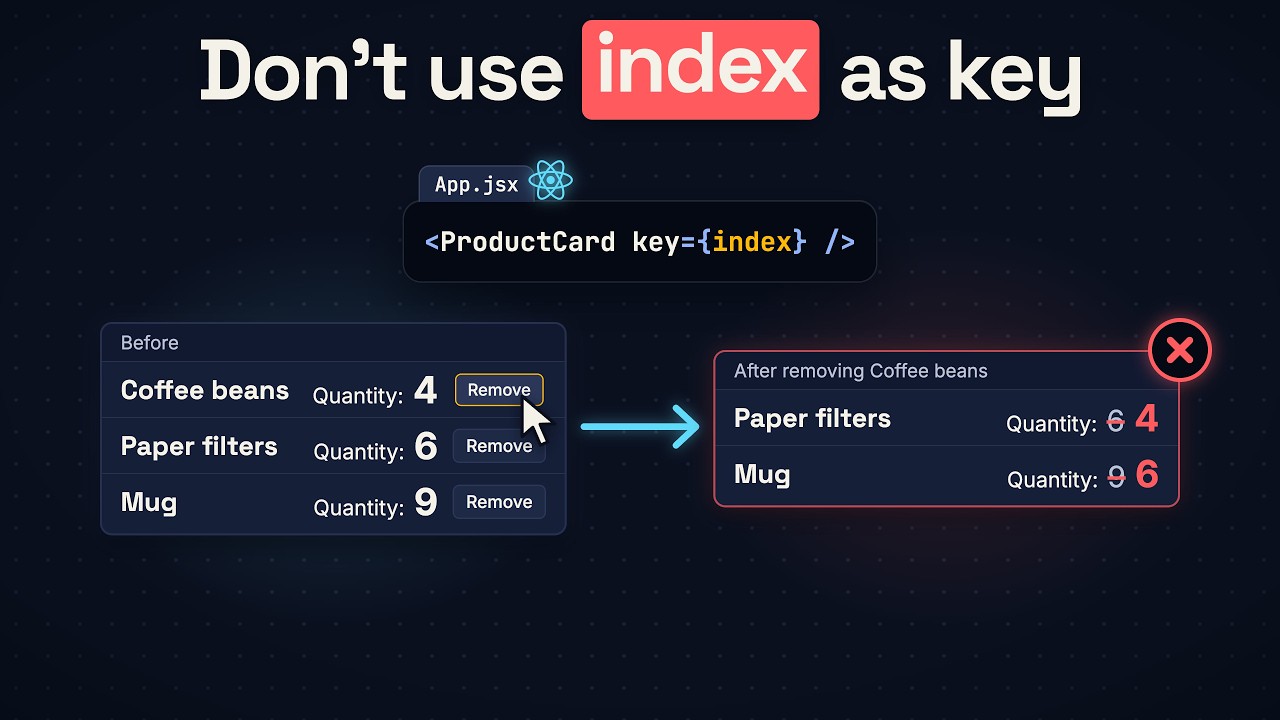
Here’s a cart with three rows: coffee beans, paper filters and a mug. Each row keeps its own quantity, with a plus button and a Remove button, and the list is drawn with key={index}. The cart says 4 bags of coffee, 6 packs of filters and 9 mugs. Remove the coffee, and the cart says 4 packs of filters and 6 mugs. The coffee’s 4 is still on the page, and the mugs’ 9 is gone.
So why is key={index} a bug? This lesson answers that first, with the fix. Then it shows how React matches rows between renders, a key that looks safer and does more damage, where a good key comes from, and how changing a key on purpose resets a component. And it answers one question you may already have: is the index ever a safe key?
The code runs in a React project made with Vite (npm create vite@latest, then React and JavaScript), the same kind of project as the last lessons. JSX doesn’t run in plain JavaScript, so you need that build step. Each example replaces src/App.jsx.
The wrong row
This is the whole app. App keeps the products in state and turns each one into a ProductCard with map. Each ProductCard keeps its own quantity, starting at 1:
import { useState } from 'react'

const startingProducts = [
  { id: 'coffee', name: 'Coffee beans' },
  { id: 'filters', name: 'Paper filters' },
  { id: 'mug', name: 'Mug' },
]

function ProductCard({ name, onRemove }) {
  const [quantity, setQuantity] = useState(1)

  return (
    <li className="product">
      <h3>{name}</h3>
      <p>Quantity: {quantity}</p>
      <button onClick={() => setQuantity(quantity + 1)}>+</button>
      <button onClick={onRemove}>Remove</button>
    </li>
  )
}

export default function App() {
  const [products, setProducts] = useState(startingProducts)

  function remove(id) {
    setProducts(products.filter((product) => product.id !== id))
  }

  return (
    <ul className="cart">
      {products.map((product, index) => (
        <ProductCard key={index} name={product.name} onRemove={() => remove(product.id)} />
      ))}
    </ul>
  )
}
Click plus three times on the coffee beans, five times on the paper filters and eight times on the mug, so the rows say Quantity: 4, Quantity: 6 and Quantity: 9. Then click Remove on the coffee beans. Two rows are left: Paper filters with Quantity: 4, and Mug with Quantity: 6.
A key is how React tells the rows apart, and React keeps a row’s quantity with the row’s key. But an index doesn’t name a product. It names a position. Before the click, the keys were 0, 1 and 2. After it, there are two products, so the keys are 0 and 1. You removed the first product, but the key that went missing was the last one, 2. So React removed the third <li>, the one that said Mug and Quantity: 9. Then it wrote the new names into the first two rows: Coffee beans became Paper filters, and Paper filters became Mug, each beside the old quantity.
The fix is one line. Use the product’s id as the key:
{products.map((product) => (
  <ProductCard key={product.id} name={product.name} onRemove={() => remove(product.id)} />
))}
Do the same clicks again. Now React removes the <li> that said Coffee beans and Quantity: 4, and rewrites nothing. The page says Paper filters, Quantity: 6, and Mug, Quantity: 9. Every quantity stays with its product.
How React matches rows
Each row keeps its quantity in state, and React stores that state between renders. So after a render, React holds two sets of rows: the rows already on the page, each with its state, and the rows your code just asked for. React doesn’t compare names. It compares keys, and there are three outcomes:
- An old key with no match: React destroys that row, and its state is thrown away.
- A new key with no match: React builds a new row, with new state.
- Two keys that match: React keeps the row and its state, and updates the name.
This comparing is called reconciliation.
You can watch it on a sort. Go back to key={index} and add a button under the list that sorts the cart by name:
function sortByName() {
  setProducts([...products].sort((a, b) => a.name.localeCompare(b.name)))
}

return (
  <>
    <ul className="cart">
      {products.map((product, index) => (
        <ProductCard key={index} name={product.name} onRemove={() => remove(product.id)} />
      ))}
    </ul>
    <button onClick={sortByName}>Sort by name</button>
  </>
)
With the cart at 4, 6 and 9, click Sort by name. The page says Coffee beans Quantity: 4, Mug Quantity: 6, Paper filters Quantity: 9. Mug and Paper filters swapped names, but the 6 and the 9 stayed where they were. The keys were 0, 1 and 2 before the sort, and 0, 1 and 2 after. Every key matched, so React kept every row in its position and rewrote two names.
Change the key to product.id and sort again. The page says Coffee beans Quantity: 4, Mug Quantity: 9, Paper filters Quantity: 6. The same three keys came back in a new order, so React moved the filters’ row below the mugs’ row, and the 6 traveled with it. No name was rewritten.
A quantity is only the example. Put a text box and a checkbox in each row, type a note in the coffee’s box and tick its checkbox, then remove the coffee with key={index}: the note and the tick are now on the paper filters. With key={product.id} they leave with the coffee.
A unique key
Leave the key out entirely, and React uses the index anyway. The page does exactly what it did with key={index}, and in development the console prints a warning when the page loads:
Each child in a list should have a unique "key" prop.Write key={index} and the warning goes away. The bug stays.
But the warning said unique. So suppose your products have no id, and you write something unique, Math.random():
{products.map((product) => (
  <ProductCard key={Math.random()} name={product.name} onRemove={() => remove(product.id)} />
))}
No warning in the console. Bring the cart to 4, 6 and 9, and remove the paper filters this time. Before you click, guess what the coffee and the mug will say.
Coffee beans Quantity: 1, and Mug Quantity: 1. Both rows are back at the starting quantity. Math.random() runs again every time the cart renders, so every key is new and no old key ever matches. React destroyed all three rows and built two new ones.
The plus button hid the problem. A plus click renders only its own row, so the quantities climbed to 4, 6 and 9 without trouble. Anything that renders the whole cart resets every row: a coupon button outside the list that only changes a line of text does it too.
A linter can notice this one. If you chose Oxlint when you made the Vite project, it reports Cannot call impure function during render on the Math.random() line. The console doesn’t.
So a key has to be the same on every render, and that means the key belongs in your data. A product from a database already has an id. When your user creates an item on the page, make its id once, in the handler that creates the item, and store the id with the item:
function addGrinder() {
  setProducts([...products, { id: crypto.randomUUID(), name: 'Grinder' }])
}
With key={product.id} and a button that calls addGrinder, add a grinder, click its plus once, and remove the coffee. The page says Paper filters Quantity: 6, Mug Quantity: 9, Grinder Quantity: 2. Never make a new id while rendering.
Now every quantity stays with its product. But sometimes state that stays is the bug.
A key outside a list
This page has no list of cards. Three buttons choose a product, and one ProductCard shows the product you chose:
import { useState } from 'react'

const products = [
  { id: 'coffee', name: 'Coffee beans' },
  { id: 'filters', name: 'Paper filters' },
  { id: 'mug', name: 'Mug' },
]

function ProductCard({ name }) {
  const [quantity, setQuantity] = useState(1)

  return (
    <li className="product">
      <h3>{name}</h3>
      <p>Quantity: {quantity}</p>
      <button onClick={() => setQuantity(quantity + 1)}>+</button>
    </li>
  )
}

export default function App() {
  const [selected, setSelected] = useState(products[0])

  return (
    <>
      {products.map((product) => (
        <button key={product.id} onClick={() => setSelected(product)}>
          {product.name}
        </button>
      ))}
      <ul className="cart">
        <ProductCard name={selected.name} />
      </ul>
    </>
  )
}
Click plus three times, so the coffee is at Quantity: 4. Then choose Paper filters. Guess the quantity on the card.
It says Paper filters, Quantity: 4. The card has no key, so React matches it by position, and an index key was only a position too. Last render, a ProductCard was in that position. This render, a ProductCard is in that position. Same position and the same kind of component, so React keeps the card and its state, and only the name changes. But the 4 belonged to the coffee.
This time you want React to throw the state away, and now you know how. Give the card a key, the product’s id:
<ProductCard key={selected.id} name={selected.name} />Set the coffee to 4 again and choose Paper filters. The key changes from coffee to filters. The old key has no match, so React destroys the coffee’s card. The new key has no match, so React builds a new card, and the page says Paper filters, Quantity: 1. That’s a key changed on purpose, and it resets all the state inside the card.
The reset has a cost. Go back to the coffee, and the page says Coffee beans, Quantity: 1. Its 4 is gone. To keep the 4, the quantity has to live outside the card.
Is the index ever safe?
Now the question from the start: is the index ever a safe key? An interviewer can ask it like this. The cart uses key={index} again, at 4, 6 and 9, and a button adds a grinder as the first row:
function addGrinder() {
  setProducts([{ id: crypto.randomUUID(), name: 'Grinder' }, ...products])
}
What quantity does the grinder show?
The page says Grinder Quantity: 4, Coffee beans Quantity: 6, Paper filters Quantity: 9, Mug Quantity: 1. The grinder took index 0, and index 0 held the coffee’s 4. Every product moved down a position, and every quantity stayed where it was. React rewrote three names and built one new row at the end.
Now change the button, so the grinder becomes the last row:
function addGrinder() {
  setProducts([...products, { id: crypto.randomUUID(), name: 'Grinder' }])
}
The page says Coffee beans Quantity: 4, Paper filters Quantity: 6, Mug Quantity: 9, Grinder Quantity: 1. Nothing is wrong, because every index still names the same product. That is when the index is safe.
Sorting changes which product an index names. So does filtering, a new page of products in the same rows, or a row added or removed before the last row. Swap the cart at 4, 6 and 9 for a second page of tea, a kettle and a spoon, and the page says Tea Quantity: 4, Kettle Quantity: 6, Spoon Quantity: 9.
And rows that keep nothing of their own can’t show the bug at all. If the quantity lives in the products array and the card only shows it, removing the coffee on index keys leaves Paper filters Quantity: 6 and Mug Quantity: 9. But a list like that can get a sort button next month, and by default nothing warns you: the console is quiet about key={index}, and so is the Oxlint setup Vite gives you. Oxlint does have a rule for it, react/no-array-index-key, but it’s off unless you turn it on. So when your data has an id, use the id.
Remember three things:
- Under one parent, React matches by key, or by position when there’s no key.
- Same key, same kind of component: the state is kept.
- New key: the state starts over.
In one line
A key is the name React knows a row by from one render to the next, so it has to name the item, not its position, and stay the same on every render: an index breaks the first rule as soon as the list changes order, and Math.random() breaks the second. Now you can read a key and say which rows React will keep, which it will destroy, and which product each quantity will be on. Next in this course: forms, and where React keeps what your user types.
Video transcript
The wrong row
This React cart uses key equals index, and here that is a bug. Watch React remove the wrong row. The cart has four bags of coffee, six packs of filters and nine mugs. Remove the coffee. Now the cart says four packs of filters and six mugs. The coffee's four is still on the page. The mugs' nine is gone. So why is key equals index a bug? A key is how React tells the rows apart. But an index doesn't name a product. It names a position. React keeps a row's quantity with the row's key. You removed the first product. But the key that went missing was the last index. So React removed the third row with its nine. Then it wrote the new names on the first two rows beside the old quantities. Change the key to the product's id and every quantity stays with its product. Six packs of filters. Nine mugs. But the index isn't the only wrong key. The next key looks safer and does more damage. Stay to the end and you'll know how React matches rows between renders, where a good key comes from, and how changing a key on purpose resets a component. And hold on to one question: is the index ever a safe key?
How React matches rows
The cart is an array of products, and map turns every product into a row. Each row keeps its own quantity in state, and React stores that state between renders. So after a render, React holds two sets of rows: the rows already on the page, with their state, and the rows your code just asked for. React doesn't compare names. It compares keys, and there are three outcomes. An old key with no match: React destroys that row, and its state is thrown away. A new key with no match: React builds a new row, with new state. Two keys that match: React keeps the row and its state, and updates the name. This comparing is called reconciliation. Now sort this cart by name, still on index keys. Mug and Paper filters swap names, but the six and the nine stay where they were. The keys were zero, one, two before the sort, and zero, one, two after. Every key matched, so React kept every row in its position and rewrote two names. With ids as keys, the same sort finds the same three keys in a new order. So React moves the filters' row below the mugs' row, and the six travels with it. And a quantity is only the example. Text typed in a box stays behind too, and so does a ticked checkbox.
A unique key
Leave the key out and React uses the index anyway. It also prints a warning that asks for a unique key. Write key equals index and the warning goes away. The bug stays. But the warning said unique. So suppose your products have no id and you write something unique: Math dot random. No warning. Predict this. The cart says four, six and nine. Remove the filters. What do the coffee and the mugs say?
One and one. Both rows are back at the starting quantity. Math dot random runs again each time the cart renders. So every key is new and no old key ever matches. React destroyed all three rows and built two new rows. The plus button hid the problem. A plus click renders only its own row. Anything that renders the whole cart resets every row. So a key has to be the same on every render. That means the key belongs in your data. A product from a database already has an id. When your user creates an item on the page, make its id once, in the handler that creates the item, and store the id with the item. Never make a new id while rendering. Now every quantity stays with its product. But sometimes state that stays is the bug.
A key outside a list
This page has no list. Three buttons choose a product. One product card shows the product you chose. Set the coffee to four. Then choose the filters. Predict the quantity on the card.
Four. The card has no key. So React matches by position. An index key was only a position too. Last render a product card was in that position. This render a product card is in that position. Same position and the same kind of component. So React keeps the card and its state. Only the name changes. But the four belonged to the coffee. This time you want React to throw the state away. Now you know how. Give the card a key: the product's id. Choose the filters and the key changes from coffee to filters. The old key has no match. React destroys the coffee's card. The new key has no match. React builds a new card at quantity one. That's a key changed on purpose. It resets all the state inside the card. The reset has a cost. Go back to the coffee and its four is gone. To keep the four, the quantity has to live outside the card.
Is the index ever safe?
Now the question from the start of the video: is the index ever a safe key? An interviewer can ask it like this. The cart uses key equals index again, at four, six and nine. A button adds a grinder as the first row. Last prediction: what quantity does the grinder show?
Four. The grinder took index zero, and index zero held the coffee's four. Every product moved down a position, and every quantity stayed. Now change the button, so the grinder becomes the last row. The grinder starts at one, and the coffee, the filters and the mugs keep four, six and nine. Nothing is wrong, because every index still names the same product. So that is when the index is safe. Sorting changes which product an index names. So does filtering, a new page of products in the same rows, or a row added or removed before the last row. And rows that keep nothing of their own can't show the bug at all. But a list like that can get a sort button next month, and by default nothing warns you. So when your data has an id, use the id. Remember three things. Under one parent, React matches by key, or by position when there's no key. Same key, same kind of component: the state is kept. New key: the state starts over.
Next: forms
Now you can read a key and say which rows React will keep, which rows it will destroy, and which product each quantity will be on. Next in this course: forms, and where React keeps what your user types. The next video is on screen now.