React props and children
Nobody clicked, but the console says all three notifications were dismissed, and a real click does nothing. The cause is one pair of parentheses, and the full answer is what a prop is. We rebuild a small notification panel from three copied blocks and pass in one prop at a time: data with title and type, read-only props, destructuring and default values, content with children and composition, and a function the child calls to talk to its parent. Then the second mystery: why every line printed twice, and what Strict Mode is for.
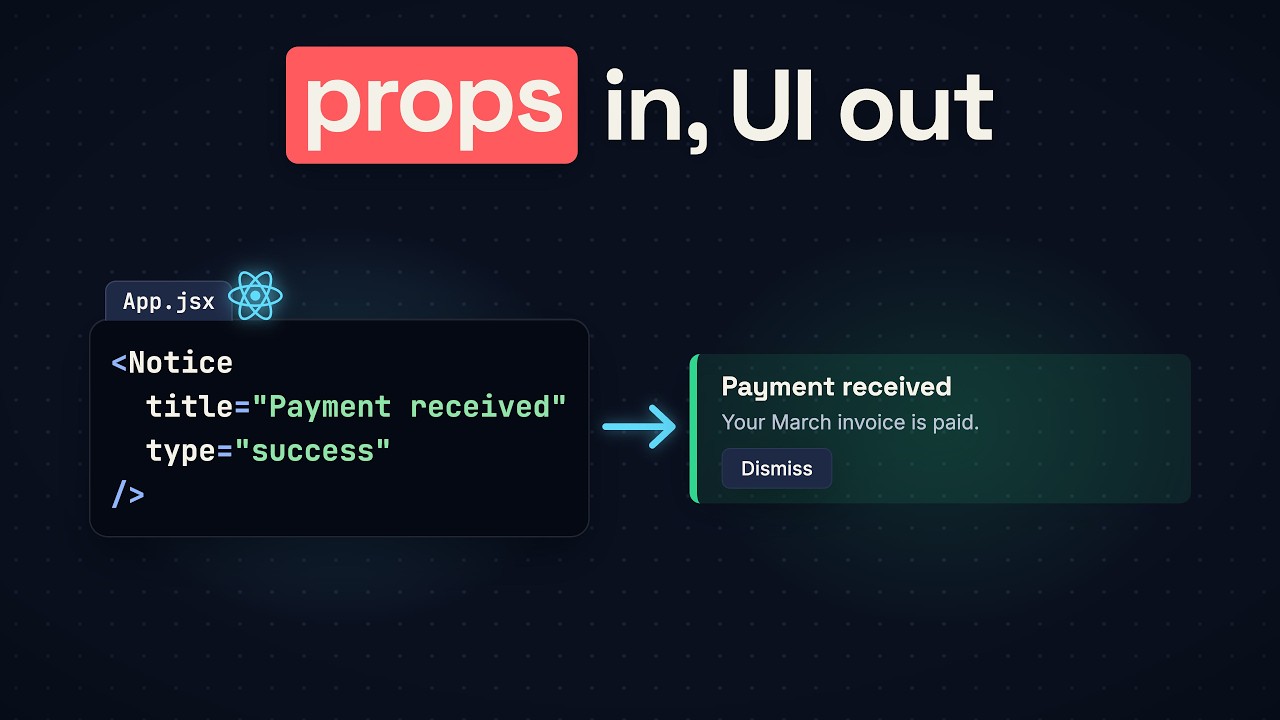

In this lesson
Here’s a notification panel with a Dismiss button on each notification. Load the page without touching anything, and the console already says all three notifications were dismissed. Click Dismiss, and nothing happens. The button seems to click itself.
The cause is two characters, one pair of parentheses, and the fix is easy. But to see why the parentheses matter, you need to know what a prop is. This lesson builds the panel from three copied blocks and passes in one prop at a time: data, then content, then a function. On the way it answers a second question: why every line in that console appears twice.
The code runs in a React project made with Vite (npm create vite@latest, then React and JavaScript). Each example replaces src/App.jsx.
Three copies
The panel starts as plain markup: three notifications, the same structure with different words.
export default function App() {
  return (
    <section className="panel">
      <h2>Notifications</h2>
      <div className="notice success">
        <h3>Payment received</h3>
      </div>
      <div className="notice warning">
        <h3>Storage almost full</h3>
      </div>
      <div className="notice info">
        <h3>New sign-in</h3>
      </div>
    </section>
  )
}
Every change to a notification’s markup has to be made three times. React’s answer is a component: a function that returns a piece of the page, used by writing its name as a tag. Move the markup into a function named Notice and use it three times:
function Notice() {
  return (
    <div className="notice success">
      <h3>Payment received</h3>
    </div>
  )
}

export default function App() {
  return (
    <section className="panel">
      <h2>Notifications</h2>
      <Notice />
      <Notice />
      <Notice />
    </section>
  )
}
App uses Notice, so App is the parent and Notice the child. There’s one place to edit now, but all three notifications say “Payment received”. They run the same function, and nothing tells one from another. The function needs input.
What a prop is
You already give tags information with attributes, so put one on your own tag: <Notice title="Storage almost full" />. Save, and nothing changes. The title went somewhere, though.
Before the browser runs your file, Vite rewrites every tag as a function call, and the tag’s attributes become one object:
<Notice type="warning" title="Storage almost full" />
// becomes
jsx(Notice, { type: "warning", title: "Storage almost full" })
Then React calls Notice and hands it that object. Calling your components is what React means by rendering. The object is called props, and each attribute is one prop. You can check that in Node: save this as props.mjs in the project and run node props.mjs.
import { jsx } from "react/jsx-runtime";
import { renderToStaticMarkup } from "react-dom/server";

function Notice(props) {
  console.log(props); // { title: 'Storage almost full' }
  return jsx("h3", { children: props.title });
}

const markup = renderToStaticMarkup(jsx(Notice, { title: "Storage almost full" }));
console.log(markup); // <h3>Storage almost full</h3>
So Notice had its title all along and never read it. Give the function a parameter named props and put props.title in the heading. In JSX, curly braces mean “this part is JavaScript”:
function Notice(props) {
  return (
    <div className="notice success">
      <h3>{props.title}</h3>
    </div>
  )
}

export default function App() {
  return (
    <section className="panel">
      <h2>Notifications</h2>
      <Notice title="Payment received" />
      <Notice title="Storage almost full" />
      <Notice title="New sign-in" />
    </section>
  )
}
Each notification now shows its own title.
Props are read-only
Suppose Notice wants to change its own title. Add props.title = 'Urgent' as the first line of the function, and the page goes blank. The console says:
Uncaught TypeError: Cannot assign to read only property 'title' of object '#<Object>'While you develop, React freezes the props object. A component reads its props and never changes them.
Destructuring and defaults
Most code doesn’t write props. everywhere. It pulls title out of the object right in the parameter list, with its own pair of curly braces. That’s destructuring, an ordinary JavaScript feature:
function Notice({ title }) {
  return (
    <div className="notice success">
      <h3>{title}</h3>
    </div>
  )
}
Forget those braces, writing function Notice(title), and the page is blank again:
Uncaught Error: Objects are not valid as a React child (found: object with keys {title}).The parameter is named title, but the first parameter always receives the whole props object, whatever you call it. The heading then tries to show an object.
With the braces back, add a second prop, type, and use it in the class name. The third notification has no type, and a prop that isn’t passed is undefined, so its class becomes notice undefined and it has no color. A default value in the parameter list fixes that:
function Notice({ type = 'info', title }) {
  return (
    <div className={'notice ' + type}>
      <h3>{title}</h3>
    </div>
  )
}

export default function App() {
  return (
    <section className="panel">
      <h2>Notifications</h2>
      <Notice type="success" title="Payment received" />
      <Notice type="warning" title="Storage almost full" />
      <Notice title="New sign-in" />
    </section>
  )
}
The default is used when the prop is missing or undefined. Pass type={null} and you get null, not info.
Content between the tags
Each notification also needs a message, and the storage warning’s message has a link in it. A string prop can’t hold that:
<Notice
  type="warning"
  title="Storage almost full"
  message="You have used 9 of 10 GB. <a href='/storage'>Free up space</a>"
/>
The page prints the tags as text, angle brackets included. A string stays a string. Instead, give Notice an opening and a closing tag and write the message between them. Saved like that, no message appears: something was passed and nobody read it, like the title at the start.
Whatever sits between a component’s tags arrives in the same props object, as a prop named children. Pull it out and place it:
function Notice({ type = 'info', title, children }) {
  return (
    <div className={'notice ' + type}>
      <h3>{title}</h3>
      <p>{children}</p>
    </div>
  )
}

export default function App() {
  return (
    <section className="panel">
      <h2>Notifications</h2>
      <Notice type="success" title="Payment received">
        Your March invoice is paid.
      </Notice>
      <Notice type="warning" title="Storage almost full">
        You have used 9 of 10 GB. <a href="/storage">Free up space</a>
      </Notice>
      <Notice title="New sign-in">
        Someone signed in from a new device.
      </Notice>
    </section>
  )
}
All three messages appear, and the link is a real link. Notice decides where the content goes; whoever uses Notice decides what it is.
The panel can be built the same way: a Panel component draws the frame and the heading and places its children inside. Fitting components inside each other like this is called composition:
function Panel({ heading, children }) {
  return (
    <section className="panel">
      <h2>{heading}</h2>
      {children}
    </section>
  )
}

export default function App() {
  return (
    <Panel heading="Notifications">
      <Notice type="success" title="Payment received">
        Your March invoice is paid.
      </Notice>
      <Notice type="warning" title="Storage almost full">
        You have used 9 of 10 GB. <a href="/storage">Free up space</a>
      </Notice>
      <Notice title="New sign-in">
        Someone signed in from a new device.
      </Notice>
    </Panel>
  )
}(Notice stays as it was.) The page is the same as before; the frame now has a name.
A message back to the parent
Now the Dismiss button. The click happens inside Notice, but the notifications are written in App, and Notice can’t change what App gave it. So how does a child tell its parent anything?
A prop in quotes is always a string, but a prop in curly braces can be any JavaScript value, and a function is a value. So App passes one down, and Notice hands that same function to its button:
function Notice({ type = 'info', title, children, onDismiss }) {
  return (
    <div className={'notice ' + type}>
      <h3>{title}</h3>
      <p>{children}</p>
      <button onClick={onDismiss}>Dismiss</button>
    </div>
  )
}

export default function App() {
  function dismiss() {
    console.log('A notice was dismissed')
  }

  return (
    <Panel heading="Notifications">
      <Notice type="success" title="Payment received" onDismiss={dismiss}>
        Your March invoice is paid.
      </Notice>
      <Notice type="warning" title="Storage almost full" onDismiss={dismiss}>
        You have used 9 of 10 GB. <a href="/storage">Free up space</a>
      </Notice>
      <Notice title="New sign-in" onDismiss={dismiss}>
        Someone signed in from a new device.
      </Notice>
    </Panel>
  )
}(Panel stays as it was.) Click Dismiss, and App’s function logs “A notice was dismissed”. React added nothing that sends data upward: the child called a function it received from its parent.
The button that clicks itself
All three buttons log the same line, so App can’t tell which notification was dismissed. Let dismiss take a title, and have the button supply it:
function Notice({ type = 'info', title, children, onDismiss }) {
  return (
    <div className={'notice ' + type}>
      <h3>{title}</h3>
      <p>{children}</p>
      <button onClick={onDismiss(title)}>Dismiss</button>
    </div>
  )
}
function dismiss(title) {
console.log('Dismissed: ' + title)
}That’s the button from the start. Reload, and before any click the console fills up:
Dismissed: Payment received
Dismissed: Storage almost full
Dismissed: New sign-in
Click a button, and nothing new appears.
The button’s tag becomes a function call too, and onClick is one property in its object. The value written for that property is itself a call:
<button onClick={onDismiss(title)}>Dismiss</button>
// becomes
jsx("button", { onClick: onDismiss(title), children: "Dismiss" })
JavaScript runs a call the moment it reaches one and keeps what comes back. So dismiss ran while React was rendering, once for each Notice, and it returns nothing, so every button got undefined as its onClick. With the parentheses you pass the function’s result; without them, onClick={onDismiss}, you pass the function, but the button calls it with the click event, so the console reads Dismissed: [object Object] and the title is lost.
To pass the title and still hand over a function, wrap the call in an arrow function, a new function that calls onDismiss later, when the click comes:
<button onClick={() => onDismiss(title)}>Dismiss</button>Reload, and the console stays empty. Click Dismiss on the storage warning, and one line appears: Dismissed: Storage almost full.
Who ran it twice?
In Chrome the console didn’t show three lines on load. It showed each line with a small 2 beside it: every line twice. The parentheses don’t explain that.
Look in src/main.jsx, the file that starts the app. Vite’s template wraps App in a component named StrictMode:
createRoot(document.getElementById('root')).render(
  <StrictMode>
    <App />
  </StrictMode>,
)
While you develop, Strict Mode makes React render every component twice. Take the wrapper out, and each line appears once.
Why do the same work twice on purpose? React expects every component to work like a calculation: the same props go in, the same markup comes out, and nothing outside the component changes. React’s documentation calls this a pure component. Strict Mode renders everything twice to catch the components that break that rule while you’re still writing them. The broken button broke it: calling dismiss wrote to the console during rendering, so the second render wrote it again. But that bug showed up even without Strict Mode. Here’s one that doesn’t.
Say you want each notification numbered. You keep a count in a variable outside Notice, and each time Notice renders it adds one and shows the count before the title:
let count = 0

function Notice({ type = 'info', title, children, onDismiss }) {
  count = count + 1
  return (
    <div className={'notice ' + type}>
      <h3>{count}. {title}</h3>
      <p>{children}</p>
      <button onClick={() => onDismiss(title)}>Dismiss</button>
    </div>
  )
}
Without Strict Mode, the page reads 1, 2, 3, and the code looks finished. But the count never goes back to zero. The next time React renders the panel, the numbers carry on: 4, 5, 6. In a real app that happens later, after something on the page changes, so your users would find the bug before you do.
With the wrapper in place, the very first load reads 2, 4, 6. Each Notice rendered twice, so it counted twice, and the bug shows up the moment you open the page.
The fix is a prop. App passes each notification its number, <Notice number={1} …>, <Notice number={2} …> and <Notice number={3} …>, and Notice shows it:
function Notice({ type = 'info', number, title, children, onDismiss }) {
  return (
    <div className={'notice ' + type}>
      <h3>{number}. {title}</h3>
      <p>{children}</p>
      <button onClick={() => onDismiss(title)}>Dismiss</button>
    </div>
  )
}
The same props go in and the same number comes out, however many times React renders: 1, 2, 3, with or without Strict Mode.
The extra render happens only while you develop. npm run build makes a production build that renders each component once, wrapper or not. That’s why React’s documentation recommends Strict Mode for every new app, and Vite’s template comes with it turned on. With the arrow function in place, Strict Mode still renders everything twice, and the console stays empty.
What props can’t do
Click Dismiss and look at the page: the notification is still there. App heard about the click, and nothing on screen changed. To remove a notification, App has to remember which ones are gone, and React has to render again. Props alone can’t do either. That memory is called state, and it’s the next step in this course.
In one line
Props are one object. Each attribute on a component’s tag is a property in it, whatever sits between the tags is the property named children, and React hands the object to your function, which reads it and never changes it. If an interviewer asks how a child talks to its parent in React: the parent passes a function down as a prop, and the child calls it.
Video transcript
This button clicks itself
This React button clicks itself. Nobody clicked, but the console already says all three notifications were dismissed. And when you do click Dismiss, nothing happens. Why? Because of two characters: this pair of parentheses. Without them, you hand the button a function to run when a click comes. With them, you run the function yourself while React is still drawing the page, and the button gets whatever the function returned. Here that's nothing. So the function ran with no click, and now a click has no function to run. That's the short answer. But look at the console again. Every line is there twice, and the parentheses don't explain that. The full answer starts with what a prop is. So we'll rebuild this panel from three copied notifications and pass in one prop at a time: data, then content, then a function. By the end you'll know what a child component can and can't do with a prop, how a child gets a message back to its parent, and who ran your code twice.
Three copies
The panel started as three notifications: a payment, a storage warning and a new sign-in. Each one is the same markup with different words, and every change to that markup has to be made three times. React's answer is a component: a function that returns a piece of the page, used by writing its name as a tag. So move the markup into a function named Notice, and write the Notice tag three times inside App. App uses Notice, which makes App the parent and Notice the child. Now there's one place to edit. But all three notifications say "Payment received". They run the same function, and nothing makes one different from another. The function needs input.
What a prop is
You already know how to give a tag information: attributes. Put one on your own tag: title equals "Storage almost full". Save the file, and nothing changes. All three still say "Payment received". Where did the title go? Before the browser runs your file, Vite, the build tool, rewrites every tag as a function call, and the tag's attributes become one object. Then React calls Notice and hands it that object. Calling your components is what React means by rendering. The object is called props, and each attribute is one prop. So Notice has had its title all along and never read it. Give the function a parameter named props, and put props dot title in the heading, inside curly braces. In JSX, curly braces mean "this part is JavaScript". Now each notification shows its own title. Suppose Notice wants to change its own title. Assign a new value to props dot title, and the page goes blank. The console says "Cannot assign to read only property title". While you develop, React freezes the props object. Props are read-only: a component reads them and never changes them.
Braces and defaults
The word props usually isn't written out, though. The common style pulls title out of the object right in the parameter list, with its own pair of curly braces. That's destructuring, an ordinary JavaScript feature. Forget that pair of braces, and the page is blank again. This time the console says "Objects are not valid as a React child". The parameter is named title, but the first parameter always receives the whole props object, whatever its name. With the braces back, add a second prop, type, and use it in the class name: success is green, warning is amber. The third notification has no type. A prop that isn't passed is undefined, which leaves the word undefined in its class name and no color on the page. A default value fixes that: in the parameter list, type equals "info". That covers data. Content is harder.
Content between the tags
Each notification also needs a message, and the storage warning's message has a link in it. Try a prop named message, with the link's HTML typed into the string. The page prints the tags as text, angle brackets included. A string stays a string. So give Notice an opening tag and a closing tag, and write the message between them. Save the file, and no message appears. This is the title's problem again: something was passed, and nobody read it. Whatever sits between a component's tags arrives in the same props object, as a prop named children. Pull children out in the parameter list and put it in curly braces under the heading. All three messages appear, and the link is a real link. Notice decides where the content goes, and whoever uses Notice decides what the content is. The panel can be built the same way: a component named Panel draws the frame and the heading, and places its children inside. Fitting components inside each other like this is called composition.
A message back to the parent
Now the Dismiss button. The click happens inside Notice, but the notifications are written in App, the parent. And Notice can't change what App gave it, because props are read-only. How does a child tell its parent anything, then? A prop in quotes is always a string, but a prop in curly braces can be any JavaScript value, and a function is a value. So App can pass one. In App, write a function named dismiss that logs a line to the console. Give it to Notice as a prop named onDismiss: only the function's name, in curly braces. Inside Notice, hand that same function to the button's onClick. Click Dismiss, and App's function runs. React added nothing that sends data upward. The child called a function it received from its parent, an ordinary JavaScript call. But all three buttons log the same line, and App can't tell which notification was dismissed. So let dismiss take a title, and have the button supply it: onDismiss with title in parentheses. Save the file. And you have just written the button that clicks itself.
Back to the parentheses
Now you can watch the short answer happen. The button's tag becomes a function call too, and onClick is one property in that call's object. But the value written for that property is itself a call: onDismiss with title in parentheses. JavaScript runs a call the moment it reaches one, and keeps what comes back. So dismiss ran during rendering, each time React called Notice. It returns nothing, so the button received undefined as its onClick. With the parentheses, you pass the function's result. Without them, you pass the function, but the title is lost. To pass the title and still hand over a function, wrap the call in an arrow function: a new function that calls onDismiss later, when the click comes. Reload the page, and the console stays empty. Click Dismiss on the storage warning, and one line appears: "Dismissed: Storage almost full".
Who ran it twice?
One question is left: who ran it twice? Back in the broken version, every line in the console appeared twice. In main dot jsx, the file that starts the app, Vite's template wraps App in a component named StrictMode. While you develop, Strict Mode makes React render every component twice. Take the wrapper out, and each line appears once. So why would React do the same work twice on purpose? React expects every component to work like a calculation: the same props go in, the same markup comes out, and nothing outside the component changes. Strict Mode renders everything twice to catch the components that break that rule while you're still writing them. The broken button broke it: calling dismiss wrote to the console during rendering, so the second render wrote it again. But that bug showed up even without Strict Mode. The next one doesn't. Say you want each notification numbered. You keep a count in a variable outside Notice, and each time Notice renders, it adds one and shows the count before the title. Without Strict Mode, the page reads one, two, three, and the code looks finished. But the count never goes back to zero. The next time React renders the panel, the numbers carry on: four, five, six. In a real app that happens later, after something on the page changes, so your users find the bug before you do. Put the wrapper back, and the very first load reads two, four, six. Each Notice rendered twice, so it counted twice, and the bug shows up the moment you open the page. The fix is a prop: App passes each notification its number. The same props go in, the same number comes out, however many times React renders. The extra render happens only while you develop: the production build renders each component once. That's why React's documentation recommends Strict Mode for every new app, and Vite's template comes with it turned on. Back in the panel, the arrow function is in place. Strict Mode still renders everything twice, and the console stays empty.
What props can't do
But look at the page. The notification you dismissed is still there. App heard about the click and nothing on screen changed. To remove a notification App has to remember which ones are gone and React has to render again. Props alone can't do either. That memory is called state, and state is the next step in this course.
Nobody clicked
So the button never clicked itself. A pair of parentheses called the function during rendering, and Strict Mode rendered twice so you would see it. And you can now say what a prop is. Props are one object. Each attribute on a component's tag is a property in the object. Whatever sits between the tags is the property named children. React hands the object to your function and your function reads it and never changes it. If an interviewer asks how a child talks to its parent in React, that's your answer: the parent passes a function down and the child calls it. The next video in this React course is on screen now.